How to Use the SMVRT Chatbot to Auto-Fill Your Legal Document
The SMVRT Chatbot makes it easy to create personalized legal agreements without the hassle of manually filling out each field. Instead of editing your document line by line, our AI-powered chatbot asks you a series of simple questions and uses your answers to automatically insert your information into the correct places in the document.
Here’s a step-by-step guide to using the SMVRT Chatbot to fill out your legal templates with ease.
Video Overview:
Step 1: Choose a Legal Template
To get started, navigate to your SMVRT dashboard, click "New Agreement" and choose the type of agreement or legal document you need. You can choose from a wide range of templates, including:
Independent Contractor Agreements
Non-Disclosure Agreements (NDAs)
Service Agreements
Consulting Agreements
Employment Contracts
And more...
Each template is professionally drafted by contract specialists and fully customizable to suit your business needs.
Step 2: Name Your Document and Start the Project
Once you’ve selected your template:
Name your Project so you can easily identify it later on your dashboard.
Name your Document so that you have a unique document name for your project.
Click “Start Project.”
This will send you directly the the SMVRT Chatbot to help you complete your document.
Step 3: Launch the SMVRT Chatbot
After clicking Start Project, the SMVRT Chatbot will automatically open. This chatbot acts as your personal AI assistant, guiding you through the process of filling out the document — without having to scroll or edit the document manually.
You’ll see a chat window appear with your first question. The chatbot will ask for key details like:
Your company name
The name of the other party
Effective date of the agreement
Payment terms (if applicable)
Project or service description
Duration of the contract
And other important contract inputs
Step 4: Answer the Chatbot's Questions
As the chatbot asks questions, simply respond in plain language. For example:
Q: “What is your business name?”
A: “SMVRT Legal, LLC”Q: “Who is this agreement with?”
A: “Jane Doe Consulting”Q: “What is the project start date?”
A: “July 15, 2025”
Each answer you give will automatically be inserted into the proper fields of your legal document.
You don’t need to worry about formatting or legal language — the chatbot takes care of that behind the scenes.
Step 5: Review and Update Your Answers Before Populating the Document
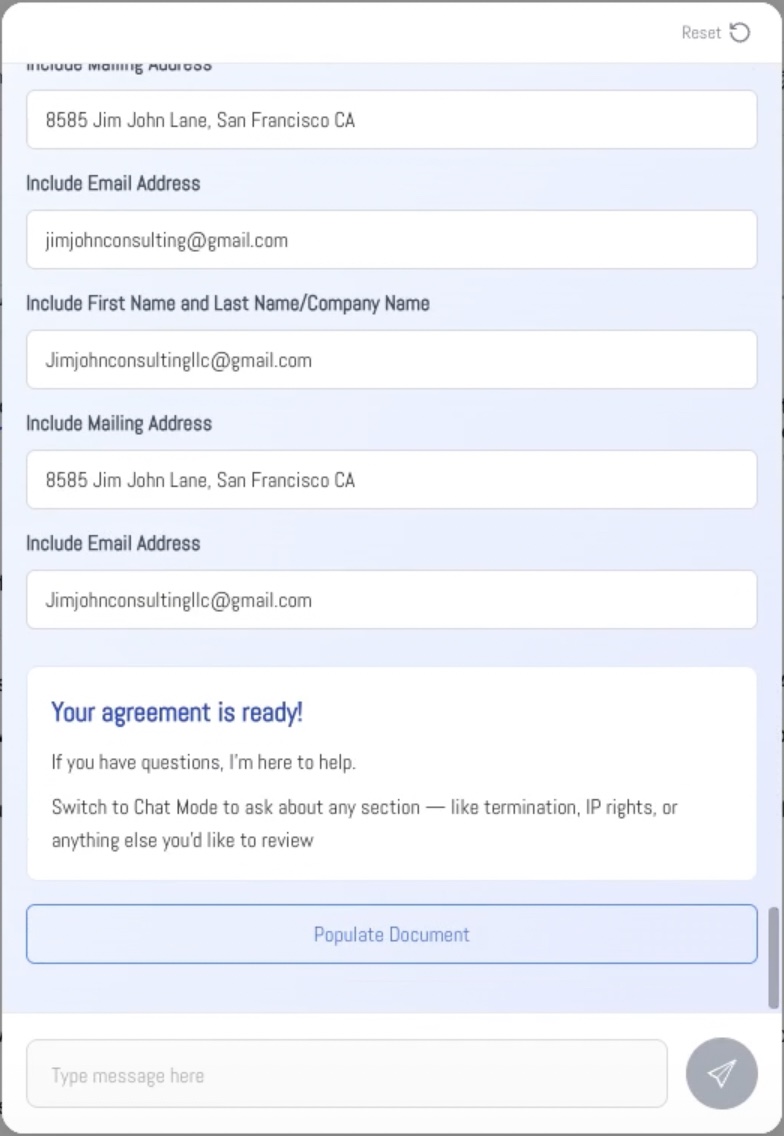
After you complete the SMVRT Chatbot, you’ll see a summary of your answers. This is your chance to review and make sure everything is accurate.
If you need to make changes, just click into any input field and update the information directly — no need to restart the chatbot. Once your answers are correct, click “Populate Document” and your updated responses will be inserted into the agreement automatically.
This step ensures your contract reflects the most accurate details before moving into editing, collaboration, or signing.
Step 6: Review and Edit Your Document
Once all questions have been answered, your completed document will be generated and loaded into the document editor.
From here, you can:
Review all pre-filled fields
Make additional edits directly in the document
Add collaborators or clients
Leave comments or ask questions using built-in tools
Track changes or suggest revisions
Your personalized agreement is now fully editable — but the heavy lifting of document population is already done
Step 7: Collaborate, Run Compliance, and Finalize Your Agreement
Once your agreement is fully populated, you’re ready to finalize and take action. From your SMVRT dashboard, you can:
Invite collaborators to view, comment on, or edit the document
Run a compliance check to flag any legal risks or missing elements based on your selected state
Ask questions about the agreement directly through the SMVRT Chatbot to clarify terms or next steps
Send for signature using our built-in e-signature tools
Every document is securely stored, timestamped, and easily accessible in your dashboard at any time.
Why Use the SMVRT Chatbot?
Using the SMVRT Chatbot to fill out legal contracts saves significant time:
Eliminating the need for manual entry
Ensuring all required fields are completed
Guiding you through contract setup step-by-step
Providing a user-friendly way to generate accurate, professional agreements
Whether you're a small business owner, startup founder, freelancer, or HR manager, SMVRT makes legal document creation fast, accurate, and stress-free.
Common Questions About the SMVRT Chatbot
Do I need legal knowledge to use the chatbot?
No. The chatbot is designed to guide users of all experience levels through the document population process. You don’t need to understand legal jargon — just answer in plain English.
Can I change the information later?
Yes. You can revisit your project and make edits at any time before finalizing and signing the document.
What if a field is missed or not filled out correctly — can I edit that information?
Yes. You can easily update any missed or incorrect fields directly within the document editor. Just click into the section you want to change, make your edits, and your updates will be saved in real time. You don’t need to restart the chatbot — full manual editing is available before finalizing or sending for signature.
Was this article helpful?
That’s Great!
Thank you for your feedback
Sorry! We couldn't be helpful
Thank you for your feedback
Feedback sent
We appreciate your effort and will try to fix the article