Dashboard Support Documentation
Overview
The SMVRT Legal Dashboard is the central hub for managing all agreements and in-progress legal documents. It provides a quick overview of active projects, recent activity, and access to essential tools.
My Project is where all "in progress" agreements are stored. Whether you've just started a new agreement or are reviewing revisions, you can easily find, access, and continue working on your agreements without starting over. Each project can be opened and edited directly within SMVRT Legal, ensuring a smooth workflow for reviewing, modifying, and finalizing contracts.
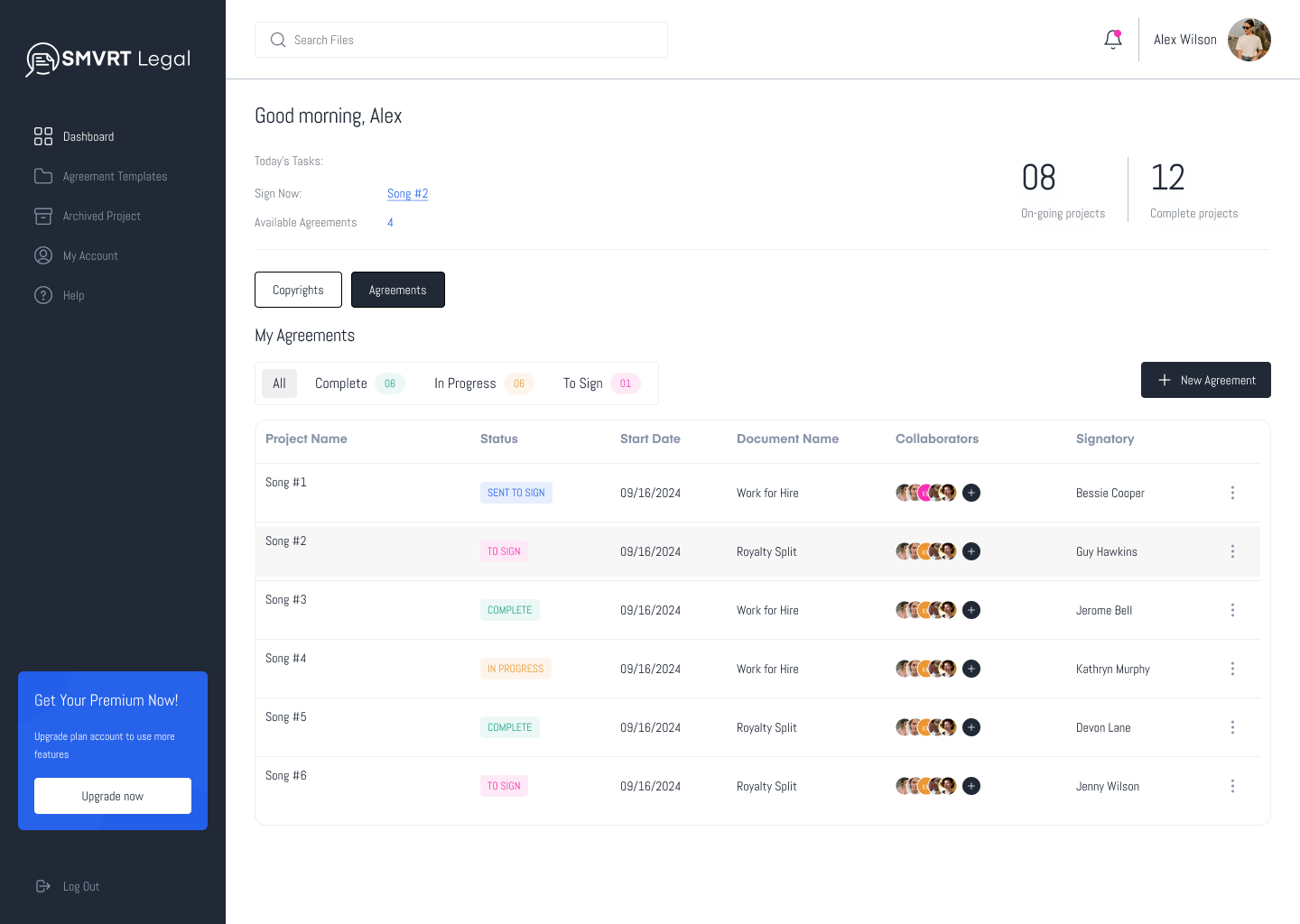
Sign Now:
- This section lists the agreements that need immediate attention for signing. It helps users prioritize their tasks for the day.
Available Agreements:
- Available agreements show the number of agreements you have left to use based on your selected S plan.
On-going Projects:
- Displays the number of projects that are currently in progress. This gives users a quick overview of active projects.
Pending Review Requests:
- Displays the number of pending review requests. For example, "12". This helps users stay on top of reviews that need attention.
Complete Projects
- Displays the number of projects that have been completed. This gives users an idea of their completed workload.
My Agreements:
- Agreements are organized based on their current status.
Status:
- All: Shows all agreements you're currently collaborating on.
- Complete: Indicates that the agreement process is complete.
- In Progress: Indicates that the agreement is currently being worked on.
- Sent To Sign: Indicates that the agreement has been sent out for signature.
- Sign Now: Indicates that the user needs to sign the agreement.
Project Details:
- Project Name: The name of the project associated with the agreement. This helps users quickly identify the specific project.
- Status: This indicates the current stage of the project process (see above).
- Start Date: This marks the beginning of the project, indicating when work on the project officially commenced.
- Document Name: The name of the document associated with the agreement. This helps users identify the specific document.
- Collaborators: The initials or names of collaborators involved in the agreement help users identify who else is involved in the process.
- Signatory: The name of the person who needs to sign or has signed the agreement. This provides clarity on who is responsible for the signature.
The dashboard is a critical tool for users to manage their agreements and projects efficiently. By providing clear and concise information about the status of each agreement and project, users can prioritize their tasks, meet deadlines, and collaborate effectively. The dashboard ensures no agreement process is overlooked and helps maintain smooth and timely operations.
Was this article helpful?
That’s Great!
Thank you for your feedback
Sorry! We couldn't be helpful
Thank you for your feedback
Feedback sent
We appreciate your effort and will try to fix the article